GLP-1 shot tracker for iPhone

A calmer GLP-1
shot tracker.
Your supply in view.

Track shots, see what medication remains, and follow progress in one private iPhone app.

Free · iPhone + Apple Watch · No account required

Private by designNo account. No ads. Local by default.
Scan to open ShotNest on the App StoreOn your computer?
Scan with your iPhone to download.
Your routine, togetherPollito keeps the details
Your full shot history, ready when you need it.
HOW IT WORKS

All the little details.
Finally in one place.

See your next shot, remaining medication, and recent progress.

Anardo Cuello, founder of ShotNest
BUILT FROM FIRST-HAND EXPERIENCE

The details matter. I’ve been there.

I built ShotNest during my own journey with Zepbound, to keep shot history, label details, and remaining supply together.

Meet Anardo and read our story
YOUR SUPPLY

Know what you have. Before you need it.

See doses remaining and refill timing on iPhone. Glance at your active vial and remaining medication on Apple Watch.

See how supply tracking works
What changesRefill planning becomes a calm heads-up instead of a last-minute surprise.
Apple Watch See what’s left
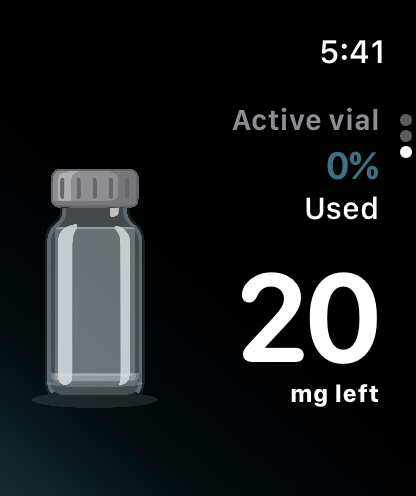
ShotNest Apple Watch page 3: active vial with medication remaining and percentage used
Your active supply, on iPhone and Apple Watch.
YOUR NEXT SHOT

Always know
what’s next.

Your next shot and trends, together on iPhone. Your schedule and shot plan, at a glance on Apple Watch.

The medication curve is an estimate from recorded shots, not a measured level or a recommendation for your next dose.

Set up shot reminders
What changes“When is my next shot?” becomes a glance, not another thing to remember.
Apple Watch Your shot plan, at a glance
ShotNest Apple Watch page 1: countdown and date for the next scheduled shot
ShotNest Apple Watch page 2: recorded shot plan with dose and next injection site
Your next shot, at a glance on iPhone and Apple Watch.
ADD SUPPLY

From the label.
Into your routine.

Scan the label or enter the details yourself, then review the medication, concentration, source, and beyond-use date before saving.

Add your first pen or vial
What changesThe details that drive dose and supply estimates start organized and verified.
Scan or enter the labelVerify before saving
Add new supply with the important label details intact.
PROGRESS WITH CONTEXT

See patterns.
Skip the pressure.

Follow weight, side effects, shots, and estimated medication levels together, so a single number never has to tell the whole story.

Medication levels are estimates based on your recorded shots, not measurements in your body. They cannot determine when or how much to take. Follow your prescription and clinician’s guidance.

What changesProgress becomes a pattern you can understand, not a score to chase.
Between-shot contextThe curve, made clear
Zoom out from one data point to the story around it.
MEDICATION DOSE GOAL

Lower or stop.
With your prescriber.

Choose a medication and starting dose, then track the dose changes you make with your prescriber’s guidance.

What changesEach clinician-guided dose change has a clear starting point and a history you can revisit.
Choose your starting doseFollow your prescriber’s plan
A clear starting point for each clinician-guided change.
SHOTNEST LEARN

Useful support,
right when it helps.

No lectures and no giant library to sort through. Open one practical lesson for the moment you’re actually in.

Find your reason Work with your appetite Navigate tricky days
One useful lessonProgress at your pace
One small lesson. One useful next step.
YOUR NEST, YOUR BUSINESS

Cozy, private,
and yours.

ShotNest works without an account and keeps your records on your iPhone by default. When available, private iCloud Sync and limited Community Insights work only if you explicitly enable them. There are no ads or third-party analytics in the app, and your health data is never sold.

How app privacy works

Read the full Privacy Policy

Local-firstOn your phone by default
No adsNo third-party app analytics
Your choiceiCloud Sync & Insights are opt-in
PRACTICAL GUIDES

A little clarity for the routine.

Plain-language guides to shot records, medication supply, reminders, and privacy boundaries.

Explore all ShotNest guides
QUICK QUESTIONS

Cheep cheep.
Here’s the scoop.

Is ShotNest free?

Yes. ShotNest is free to download from the App Store. You can track your routine without creating a ShotNest account.

Which devices does it support?

ShotNest runs on iPhone with iOS 16.4 or later. Its companion Apple Watch app requires watchOS 10 or later and shows a limited, read-only snapshot of your routine.

Which GLP-1 medications can I record?

The medication catalog includes Zepbound and Mounjaro (tirzepatide), Ozempic and Wegovy (semaglutide), and entries for prescribed compounded semaglutide and tirzepatide. Pen and vial options depend on the medication. Recording a product is not an endorsement or a check of its safety. Always follow your actual prescription and label.

What can I track?

Shots, doses, injection sites, weight, side effects, health goals, medication dose goals, medication supply, and learning progress. Explore shot tracking.

How do shot reminders work?

Turn on Shot Reminder in ShotNest’s Settings → Notifications and allow notifications on your iPhone. Alerts follow your saved shot plan and are scheduled locally. Focus and notification settings can affect delivery. Read the reminder setup guide.

How accurate are supply estimates?

They depend on the container details and shots you record. Waste, missing entries, and prescription changes can make actual supply differ. Estimates help you plan; they do not verify a dose, expiry, or whether medication is safe to use. Understand supply estimates.

Does ShotNest give medical advice?

No. ShotNest is a tracking and educational tool, not a medical provider. Medication-level curves are estimates, not measured levels. Your prescription, medication instructions, and licensed clinician remain the source of truth.

Does it work with Apple Health?

Yes. You can optionally import body measurements and separately enable weight export. You stay in control of Health permissions. Learn about Apple Health.

What happens to my records and label photos?

Records start on your iPhone. Label scanning happens on-device, and source photos stay on the iPhone where you added them. Optional iCloud Sync and Community Insights are separate features and operate only when available and explicitly enabled. Read the app privacy guide.

READY WHEN YOU ARE

A little less
to remember.

Free for iPhone. No account required.

Download on the App Store